Boxee Box review and screenshot tour
Last updated Jan 9, 2012 — 69322 views [Updated Jan 27, 2013] — Powered by Boxee’s popular media streaming software platform, D-Link’s DSM-380 Boxee Box delivers movies, show episodes, and other A/V content in numerous formats from Internet sites, LAN shares, and attached media to TVs and audio systems.
|
|
 When Boxee announced its
So, what’s a Boxee Box?
The D-Link Boxee Box is a creatively — though somewhat inefficiently — shaped device that contains a Linux-based embedded computer powered by a 1.2GHz Intel CE4100 Atom processor.
The device’s main functional capabilities are essentially those of the Boxee multimedia software on which it’s based. Namely, it…
- Streams thousands of freely available TV shows from various networks’ websites
- Plays thousands of add-supported movies and TV episodes, which are freely available for on-demand streaming from numerous web-based providers
- Streams thousands of premium movies and TV episodes from subscription-based or pay-per-view web services, such as Netflix and Vudu
- Plays videos, songs, or pictures from an attached USB drive or from home network shares
- Plays or displays non-DRM video, audio, and photos from anywhere on the Internet
Stylish, eye-catching design
The unusually shaped, cuboid box measures 4.7-inches on a side and has a flush power button on its top. According to D-Link, the innovative industrial design was developed by Astro Studios, which counts among its past accomplishments Microsoft’s stylish Xbox 360+.
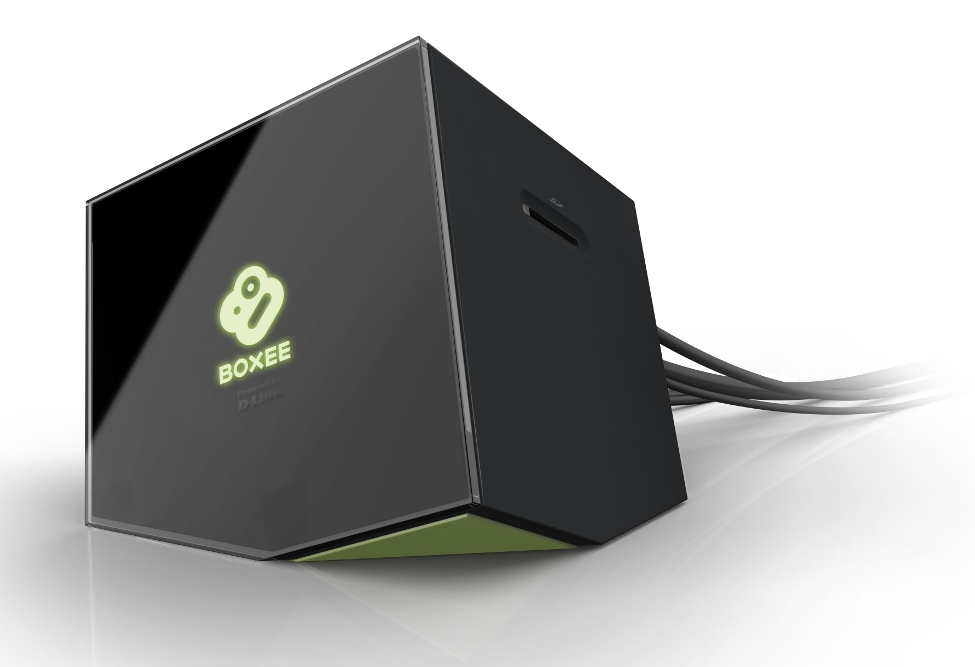
D-Link’s Boxee Box
(Click image to enlarge)
While we admire the device’s creative design, a more traditional, flat, rectangular mechanical design would have integrated more efficiently with the rest of our entertainment gear, which is stacked within an equipment cabinet. The D-Link device might look cool out in the open, but the device’s small, continually-running cooling fan is considerably less annoying behind the cabinet’s closed door. Nothing’s more annoying than the drone of a cooling fan amidst the quiet, poignant moments of a film!
Boxee Box specs
Here’s a list of the multimedia, interface, and networking standards the device supports, as listed by Boxee:
- audio formats: MP3, WAV/PCM/LPCM, WMA, AIF/AIFF, AC3/AAC, OGG, FLAC, DTS, Dolby Digital/Dolby True HD
- video formats: Adobe Flash 10.1, FLV/On2 VP6 (FLV/FV4/M4V), H.264 AVC (TS/AVI/MKV/MOV/M2TS/MP4), VC-1 (TS/AVI/MKV/WMV), MPEG-1 (DAT/MPG/MPEG), MPEG-2 (MPG/MPEG/VOB/TS/TP/ISO/IFO), MPEG-4 (MP4/AVI/MOV), DivX 3/4/5/6 (AVI/MKV), Xvid (AVI/MKV), WMV9 (WMV/ASF/DVR-MS)
- Image formats: JPEG, PNG, GIF, BMP, TIFF
- Playlist formats: M3U, PLS, WPL
- Subtitle formats: SRT, SUB, SSA, SMI, ASS
- Screen resolutions: H.264: 1080p at 30 fps, 1080i at 60 fps; WMV9/VC-1: 1080p at 30 fps, 1080i at 60 fps; MPEG4: 1080p at 30 fps, 1080i at 60 fps; MPEG2: 1080p at 30 fps, 1080i at 60 fps
- Network protocols: IPV4, ARP, TCP, UDP, ICMP, DHCP Client, DNS Client, DDNS Client, HTTP Server, Samba Client, RTP/RTMP, VPN: PPTP, UPnP
Connections
An SD Card slot, located on the device’s side, is barely visible in the photo above. The photo below shows the following I/O and power connections, which are situated on the Boxee Box’s rear panel:
- HDMI port
- Optical digital audio (S/PDIF) out
- Stereo analog audio out
- Ethernet RJ-45 connector
- 2 USB 2.0 ports
- AC power input jack
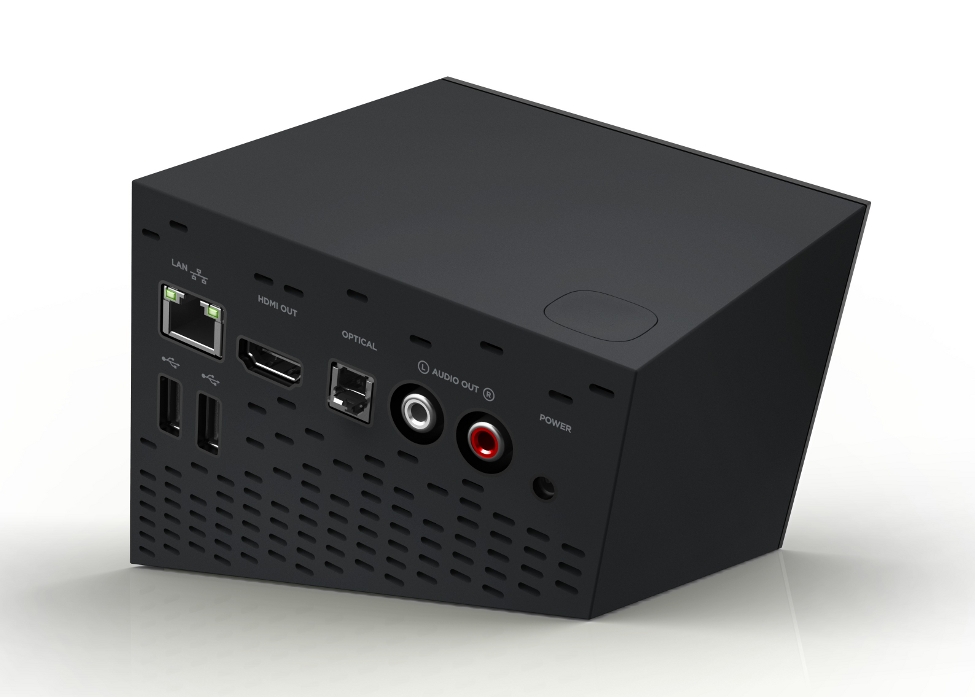
Rear panel connections
(Click image to enlarge)
RF-wireless remote
The Boxee Box comes with a small, easy-to-use, RF-wireless remote control. During operation, nearly everything can easily be accomplished with the handful of navigation keys that are located on the front side of the remote.
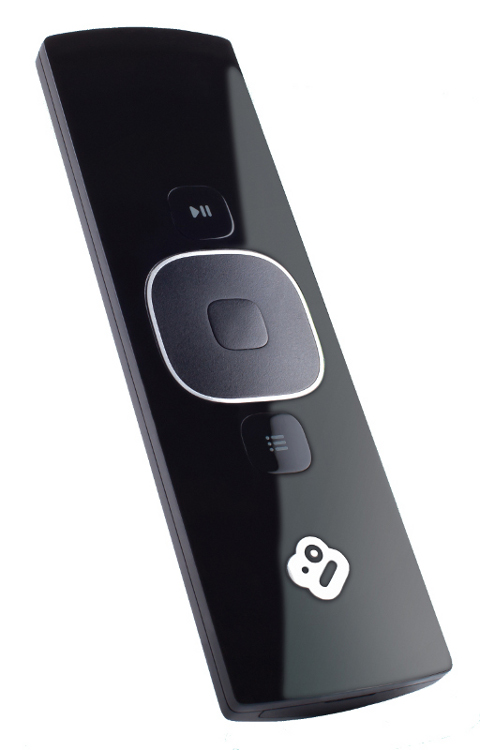

Remote control front (nav keys) and rear (qwerty keys)
(click images to enlarge)
When you want to search for content or enter a specific URL, however, you need to enter text. Although the Boxee software’s on-screen keyboard works fairly well for this purpose, it’s slow and somewhat cumbersome. To simplify this process, the remote control’s rear side provides a complete qwerty-style keypad. Unfortunately, it’s hard to read the key labels under the dim lighting conditions typically associated with TV watching. Hopefully, D-Link will address this problem in a future update to the remote.
Below are two additional photos of the D-Link Boxee Box and its remote control. As seen in the photos, one side of the remote has a qwerty-style keyboard, while the other provides several buttons compatible with the Boxee software’s simple navigation interface.
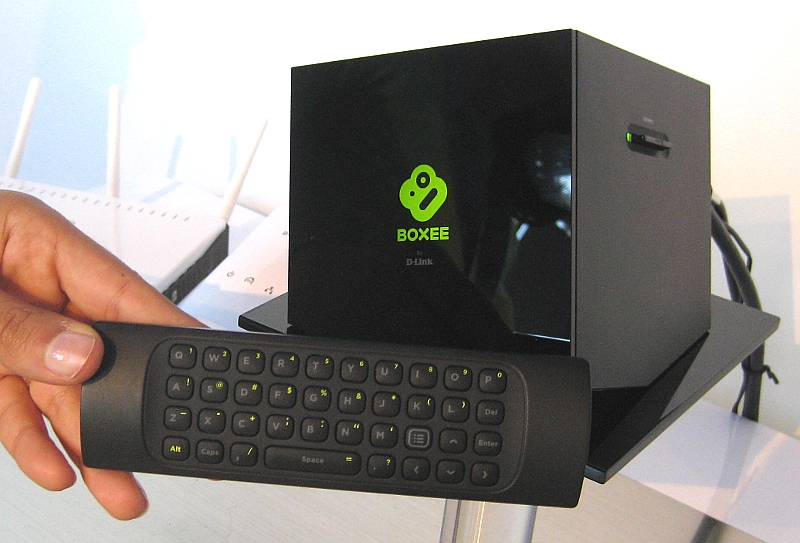
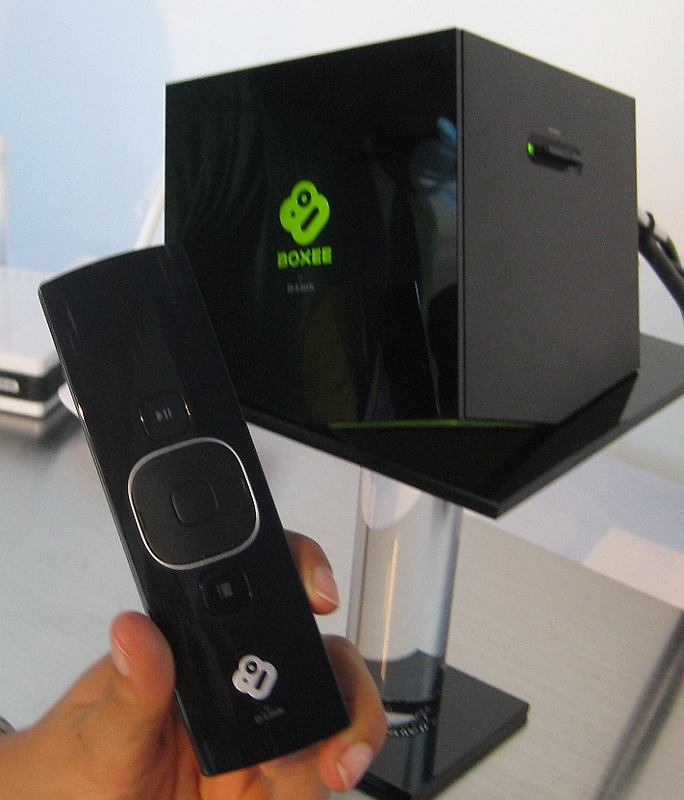
(click each image to enlarge)
Using the Boxee Box
The recent Boxee Box v1.5 firmware update implemented significant user interface and feature additions and enhancements, relative to our initial review last April and the v1.0 firmware update review in May.
- Home Screen — users are greeted by the following home screen when the Boxee Box first turns on (note: the “Live TV” option is only present when a Boxee Live TV adapter is detected).
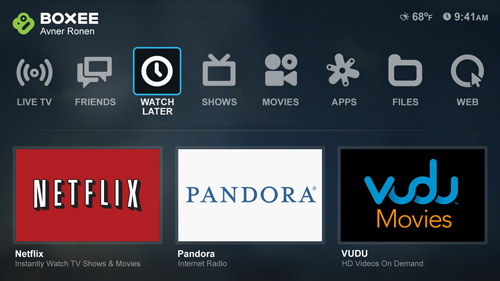
Boxee Box Home Screen
- Menu — the Menu pops up as an overlay, allowing you to quickly navigate between different sections or search; the Search function has been optimized to minimize the number of clicks required.
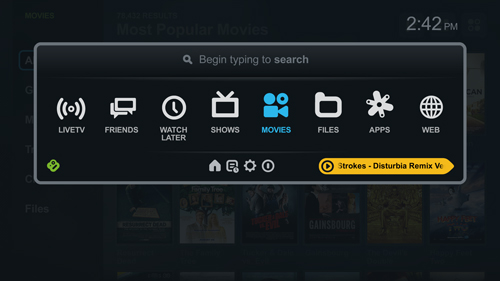
- Movies & TV Shows — the Movies and TV Shows screens are designed for easy navigation by Genre and Source, and for quick access to trailers; for TV Shows it’s easy to jump between seasons and see which episodes you’ve already watched.
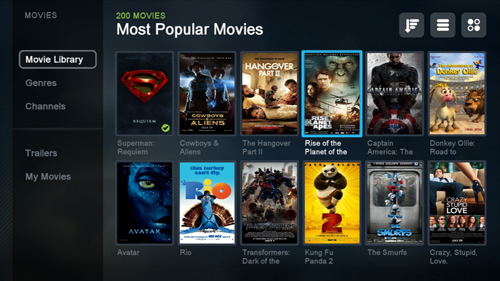
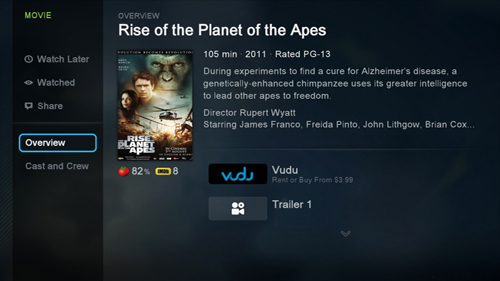
- Movie details screen — as of the v1.5 update there’s a Movie details screen, which provides extended synopsis and cast and crew information.
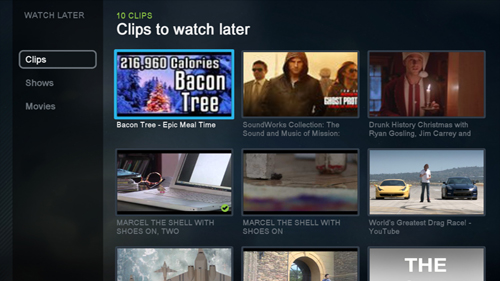
- Watch Later & Friends — you can filter between clips, TV Shows, and Movies.
What’s playing on the Boxee Box?
 The Boxee Box’s app library reports that over 250 apps are available for streaming audio and video or viewing various other types of content on the device, not counting apps that can be obtained from third-party repositories.
On the Boxee Box, you can browse the extensive set of apps by app popularity or by category. You can also designate as many apps as “favorites” as you like, making it quick-and-easy to launch the ones you use most frequently.
Visit this section of our screenshot tour to explore the wide selection of available apps. Also, this DeviceGuru post contains a list around 200 of the available apps, including links to many of their content sources, where you can learn more about what they have to offer.
Complete screenshot tour
The screenshot tour below gives a more comprehensive sense of the Boxee Box’s user interface and features, as of its version 1.5 firmware update. The screenshots in the tour are sorted by category and accompanied by comments. Click the tour’s screenshot thumbnails to view larger images. If you prefer, you can access the entire screenshot tour in its dedicated post, here.
Screenshot tour index:
Boxee iPad App
Boxee has created a nifty “Boxee for iPad” app that can be used with, or without, a Boxee Box. In fact, most of what the iPad app does takes place on the iPad, not on the Boxee Box.
Used in conjunction with the free Boxee Media Manager app for desktop PCs and Macs (available here), the Boxee for iPad app can stream video files from the desktop system to your iPad while you’re within your home network.
Another feature of the Boxee iPad app that works whether or not you have a Boxee Box, is that you can access your Boxee Watch Later queue directly on the iPad and play the videos there. But if you have a Boxee Box, you can also send those videos over to the Boxee Box for playing.
Here’s a screenshot from the Boxee for iPad app:
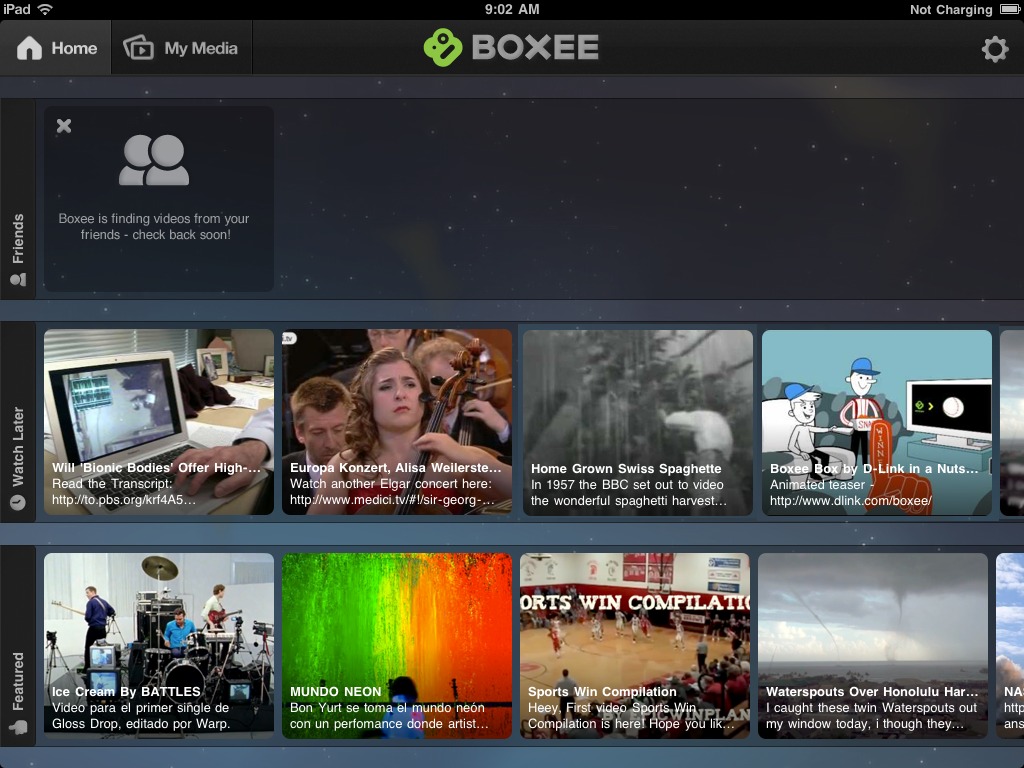
Boxee for iPad provides four content channels
(click image to enlarge)
As seen in the above screenshot, Boxee for iPad provides four video stream channels:
- Friends — videos shared by your friends on Facebook, Twitter, and Tumblr
- Watch Later — videos you add to your personal Boxee playlist from your PC or Mac, using the Watch Later bookmarklet
- Featured — a continually updated feed of videos selected by Boxee’s editorial staff
- My Media — videos streamed from a Mac or Windows PC on your home LAN
For more information and screenshots, read the complete Boxee for iPad post at BoxeeBoxTips.com (DeviceGuru’s sibling site).
Boxee Live TV Option
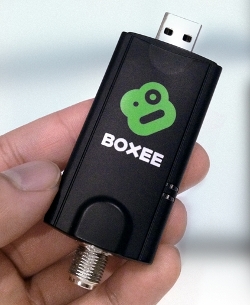 Boxee Box users will soon be able to play live broadcast TV channels, with the addition of an inexpensive USB HDTV-tuner dongle (pictured at right; click to enlarge). The “Boxee Live TV” capability is supported by Boxee Box firmware version 1.5 or later.
According to Boxee, this feature will enable D-Link Boxee Box users to watch live, broadcast HDTV transmitted via ATSC in the U.S. It will also work with an unencrypted cable connection (using ClearQAM). The capability requires adding a small live-HDTV USB adapter (pictured below), available from Boxee’s website.
Initially Boxee Live TV will only work on the D-Link Boxee Box — not on PCs and Macs running Boxee’s free, media-streaming software platform. Also, it only supports users in the U.S. and Canada, for now.
The $49 Boxee Live TV product includes a small “portable” HDTV antenna (see below), which shouldn’t be expected to be sufficient in many installations, according to Boxee. “For users without a strong over-the-air signal, we recommend a roof-top antenna or a basic cable package (usually free with a Cable Internet),” says the company.
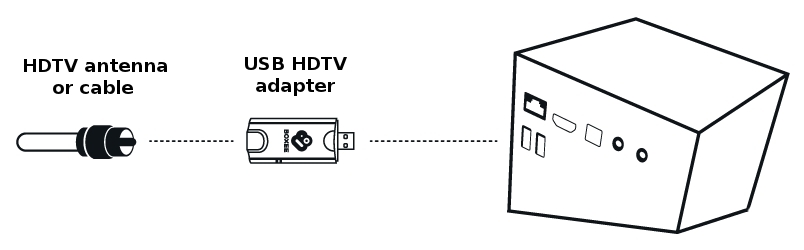
(click image to enlarge)
What about DVR capabilities? The company recently answered this question as follows: “No. The focus of Boxee Live TV is well… Live TV….” However, “having said that, if we get enough users asking for DVR then we could take advantage of that other USB input on the back of the box and let a user connect a drive for recordings.”
All this, and AirPlay too!
Another really great feature of the current Boxee Box firmware is its integrated support for Apple’s AirPlay media-streaming technology, which is now enabled by default.
What’s that do?
From an iPhone, iPod Touch, or iPad running iOS 4.2 or later, you should be able to select “Boxee Box” as the AirPlay target for remote rendering of audio or video, as though it was an AirPort Express or Apple TV box.
Below are some screenshots showing video and audio being streamed via AirPlay video and audio from an iPod Touch and an iPad 2 to a Boxee Box, as indicated in the captions.
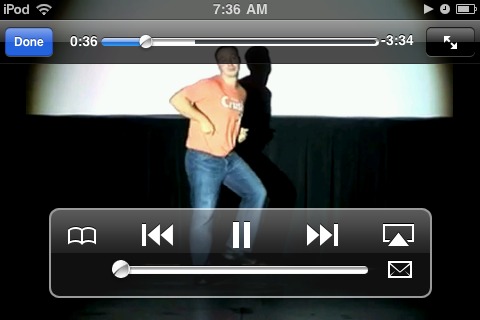
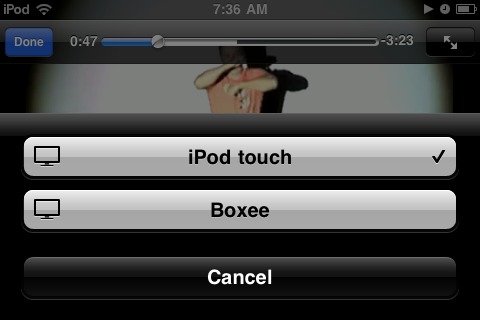


Video from the YouTube app on an iPod Touch being AirPlay-streamed to a Boxee Box
(click thumbnails to enlarge)
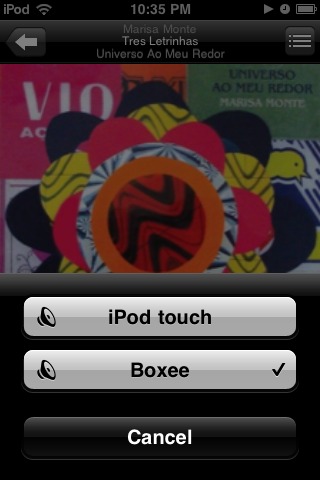
A song from Pandora on an iPod Touch gets AirPlay-streamed to a Boxee Box
(click image to enlarge)

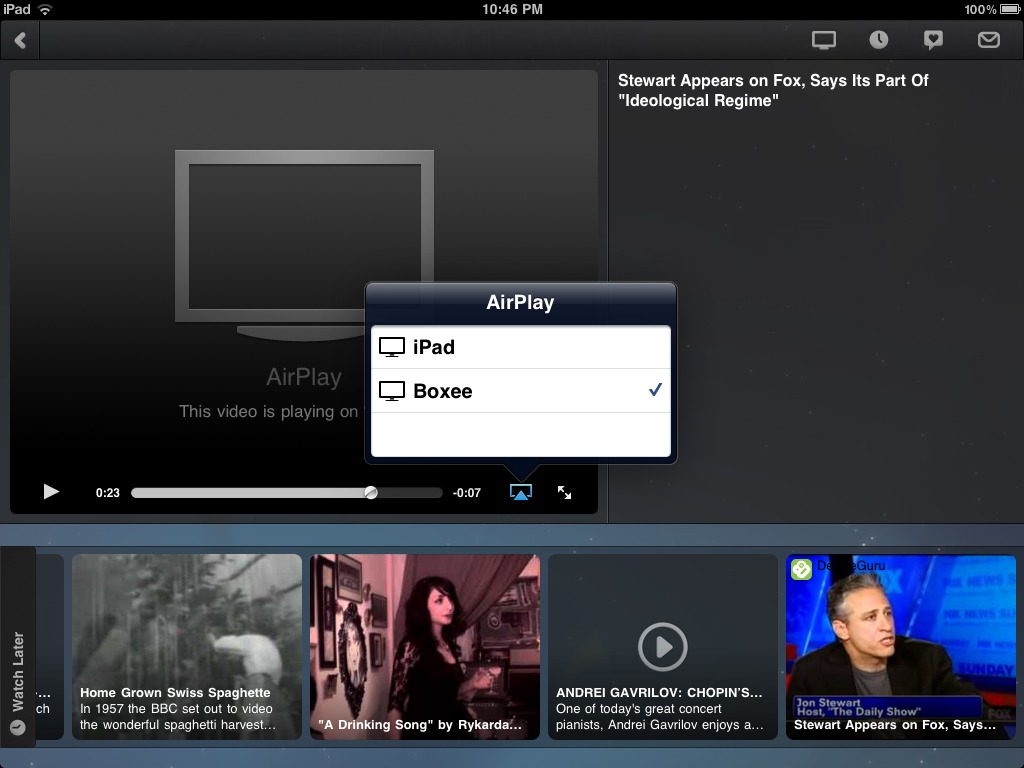
TV episode in Boxee for iPad being AirPlay-streamed to a Boxee Box
(click image to enlarge)
Overall assessment
So what do we think about the Boxee Box with the v1.5 firmware upgrade?
Quite simply: although it’s not perfect, we love it! The Boxee Box’s hundreds of apps can stream a dazzling range of movies and shows (free, ad-supported, and pay-per-view), it offers virtually unlimited browser-based access to additional web-based content (note: shortly after this review was published, the Boxee Box ran into a serious problem relating to playing Flash video; see “update” below), and it can also access and play content located on both attached media and LAN shares. Still, all those great features don’t mean it’s the best choice for everyone.
How does the Boxee Box compare with the growing field of competing products? To answer that question, we’ll soon post a comparison of the specs and features of the Boxee Box, Roku player, Google TV, and Apple TV. Watch for that post to show up here at DeviceGuru.com over the next several weeks.
In general, we highly recommend the Boxee Box as today’s TV-attachment device with access to the broadest range of streaming media content from both Internet and local sources, provided the user isn’t the sort to be intimidated by its somewhat complex array of menus, features, and options.
 Alternatively, we tend to suggest the Roku player (pictured on the right) to users preferring a more point-and-shoot-style product, provided they don’t mind being limited to the “canned” media-streaming apps in Roku’s channel store. That is, since Roku’s design lacks a built-in web browser, the device can’t navigate to user-specified content such as Comedy Central’s Daily Show or other online favorites. On the other hand, the Roku devices are priced at one-third to one-half the price of the Boxee Box.
Watch for our soon-to-be-published “smackdown” comparison, for further insight into the alternatives.
Further information
For further information on the Boxee Box, visit the Boxee user forum, the Boxee Box knowledge base, or D-Link’s product pages.
|
The Boxee Box has just developed a serious limitation. As a result of recent updates to Adobe’s Flash player, some highly popular content sources — including Comedy Central’s “Daily Show” and “Colbert Report” — no longer stream to the Boxee Box, and it’s likely that the problem will also impact video streaming from other popular sites. At this time, Boxee is uncertain when a Boxee Box firmware update with the required plugin can be made available. As the company states in two quotes below, this situation is at least partly attributable to the ongoing transition to HTML 5. Please refer to this post on Boxee’s user forum for more details. |
Though this box has potential its a over priced mess.
The new UI does make it look better but its just slapping makeup on to hide glaring issues.
The Bad… (sadly there are a lot):
* Left standing without being used for a period of time and the box has a habit of freezing.
* The box does feature a browser but it has outdated flash and crashes as much as it works.
* Audio drops outs still abound do in part to intel drivers issues.
* Scanning is massively cpu intensive and badly implemented and shockingly outdated.
* This makes the box sluggish and unresponsive with collections beyond a few items.
* Each new firmware update has introduced more bugs then they fixed and at the same time removed features.
…this bug list could go on for quite sometime.
For a newly released box issues like this could be understandable and excused for a short period but not for one thats been out over a year.
This box is simply far too buggy and with boxee spending there time making new expensive addons instead of fixing the mass of underlying issues its not to be recommended.
There are many other boxes like the Roku, Wd tv live, or popcorn box which simply work as promised and cost less.
There’s also the fact that these boxes live on their reputation and boxee reputation is anything but good now.
Oh please…
I have a popcornhour a-200 and it keeps breaking down, and there is no more development on the firmware.
Youtube application on the thing is horrid, half the videos are so pixelated that you might as well not watch them (i have 50mbit internet, so no, its not lack of bandwith).
popcornhour only works semi ok with 3rd party stuff like yamj and eversion, the nmj they built is horrible, and takes forever to crawl through your files if you have more than a few.
And it has huge issues with Video_TS folders, and cant handle DTS_MA files in high bitrates either..
You’re correct, the older popcorn box has many mistakes in it. But you could use third party software to improve the experience and get some decent function out of it.
New popcorn boxes are a large improvement and show they actually listened.
Boxee clearly isn’t listening or doesn’t care since today they released 1.5..err its actually the beta v1.5.0.23615 but they are calling it the final 1.5 now.
It includes basically all the bugs from earlier versions plus some new ones and thats because its basically just a new UI slapped on the same old firmware.
Compared to say something like the WD Tv live/plus its a overpriced shockingly buggy mess.
Thats just one box of many out there and some like the wd models costing half the price.
But the real question is would you buy this box now knowing it’s got this many issues and no real idea when or if they are going to get fixed.
That was sort of a rhetorical question I guess, since common sense would lead people to buy a box that does what it promises and has a good reputation.
Boxee Box user here, and I totally agree with Pharaoh. The thing is a mess. One year ago, it was excusable. Now, not so much. After the 1.5 update, the browser no longer works. It crashes every single time I open it, perhaps from a bug that surfaces when it tries to render the bing.com homepage. It’s impossible to workaround. I can’t type google.com fast enough in the address bar before it crashes, and Boxee will not let you change the homepage. It’s almost comical to watch it open, render, crash, open, render, crash. This is a new bug with 1.5 and, as Pharaoh says, many of the old bugs are still there. I absolutely would not buy this device again, nor would I recommend it to anyone. Say hello to Ebay (or goodwill), Boxee Box. I’m going to get a Roku.
The Boxee box is the best piece of equipment that never was. I want to love it so much but everything that it gives me that I love, it does it in a way I hate.
* Browser full flash support – no tabs and until recently popups were a real issue.
* Beautiful menus – terrible navigation.
* RSS Podcast Playback – can’t seek forward or backwards.
* Multiple applications – no task manager so when an app crashes you restart Boxee Box.
* New Playback menu – I can’t switch the play duration the show the total time watched rather than the total time remaining.
* New Update – lose the ability to search for subtitles both on-line and in a folder, when a new device connects to my network it interrupts playback
I pride myself on researching my electronic products before purchasing them, but no one can blame me for being blinded by the rich feature set the Boxee Box boasts. However the Boxee Box does not deserve the right to boast with its poor buggy implementation of nearly every feature and even worse is that the development team is more focused on the addition of new features rather than bug fixes.
* New Playback menu – I can’t switch the play duration the show the total time watched rather than the total time remaining.
–> Yes, you can.
* New Update – lose the ability to search for subtitles both on-line and in a folder, when a new device connects to my network it interrupts playback
–> It was fixed.
* Beautiful menus – terrible navigation
–> No, its not.
* Multiple applications – no task manager so when an app crashes you restart Boxee Box.
–> You want a setup box or a HTPC?
* Browser full flash support – no tabs and until recently popups were a real issue.
–> Popup was fixed. Sites with new Flash version dont load, indeed.
Comparing the BB with other devices, the BB wins. As a customer, I see a lot of bugs with the firmware 1.5, but the BB team is working to fix them and new patches have been released.
Just published a longish piece on my blog about why I’m (very reluctantly) moving on from the Boxee Box. After nearly a year, and many firmware upgrades, I’ve reached the conclusion that the Boxee team is more interested in new features than making sure that their existing ones work reliably.
Like some of the other posters, I really, really wanted to love the Box. I like many things about it. But, ultimately, if it doesn’t handle the basics over the long term then it’s a failure – it’s far from the only game in town, especially now that TVs are starting to build this stuff in.
Anyway, have a read. My use-case may not match yours.
FYI, there’s a new beta Boxee Box firmware beta ISO (1.5.1.23679) available now for download from Boxee’s website. See this boxee forum thread for details.
Sadly the latest beta is the same as all the others.
Fix one thing add five other bugs.
There is hope though from what i hearing a major overhaul is in the works since boxee current state has hurt its public image.
If they can address the basics that are busted or out of date then this box could live up to its hype.
Boxee Flash player plugin problem…
There’s some bad news from Boxee regarding difficulties tracking the latest version of Adobe’s Flash player technology.
Some of us have recently discovered that Comedy Central episode streaming (e.g. the Daily Show and the Colbert Report) and other Flash web content can no longer be played on Boxee, whether through site-specific Boxee apps or via the Boxee web browser. When viewed through the Boxee browser, the video does not begin playing; instead, the web page responds with a message stating that an update to the latest Adobe Flash plugin is required.
Unfortunately, there’s no way to do that on the Boxee box, since it’s not using a standard browser and there aren’t any off-the-shelf Flash plugins for users to load. In short, it requires a firmware update from Boxee.
Boxee is aware of this problem and is attempting to overcome it, but currently there is no ETA for a firmware update that will fix it. Two recent comments from Boxee staff regarding this issue appear below…
* Originally posted on the Boxee forum here, by Boxee’s Marcel:
* Originally posted on the Boxee forum here, by Boxee’s Yuvalt:
For further updates on this issue, visit the Boxee user forum, here.
Sadly, I must now agree with Jon. One after one, all the streaming websites are become inaccessible to Boxee’s embedded Flash player. And, if you look at the literally HUGE amount of confirming reports and pain found on **[JIRA] Commented: (BOXEE-10861) Flash version 10.3 in Boxee Browser** you will see that the complete lack of attention and lack of engaged customer care shows you that the product will shortly have such a negative downward emotional spiral as to be unrecoverable.
I’m off to research another more promising device and technology. I had such high hopes.
The many “But it’s not our fault!” comments from Boxee management and investors belie a simple fact of life: Poor product design and decisions taken in the very beginning stages- how could you not realize that your product was so dependent upon a fickle technology supplier known to issue multiple sub-version updates yearly, and not provide some method for a viable workaround or re-flashed software. Couple that with non-existent customer advocacy… and good bye to your common and preferred shareholder value.
I don’t know what some people are expecting but we love our Boxee. But then you need to have a use for it and realistic expectations.
As a matter of self preservation we’ve ripped all our DVD’s to our home server to keep our children from destroying them over and over again. The Boxee box plays all our DVD .ISO files flawlessly. The Boxee Box also plays Netflix and Vudu content without issue. We also have a WD Live TV box (without netflix) and the Boxee is far superior.
If you want a HTPC get a HTPC. If you need something to play every flavor of flash and be constantly updated every time Adobe gets a wild hair up it’s keister you need a PC. If you need a web browser that will be constantly updated and will play every file, every time.. You need a HTPC. And if you want a box that will flawlessly bit stream uncompressed blu-ray discs with full lossless HD audio without dropping a single frame or bit of audio to your $20k home theater setup then shame on you for skimping out and spending more on a power conditioner than the core device responsible for for getting your data TO that system. You have nothing to whine about for going cheap. Do you spend $60k remodeling your house and setting up a full gourmet kitchen with a 44″ Aga range, granite countertops, the best hardwood cutting boards and then complain because the $25 ginsu knives fail to meet your expectations?
Expecting a $150 embedded box to do everything as your i7 with 12gb of ram and dual GTX560’s is not a realistic expectation either. Yes. They promised the world. But what product has never marketed beyond it’s true capabilities? And they are constantly updating their product.
The Boxee Box is an excellent network streaming device. It does what it sets out to do admirably well. And if you have realistic expectations it will, most likely, not disappoint you.
Blakwing boxee box is a half-backed joke and not a excellent device.
We don’t expect a 150$ box to do everything but we do expect it to do what it advertises.
My 30$ AVerLife ExtremeVision Media Player performs better then this box does.
My Wd Tv Live does most of what the boxee does and does it with out issue.
Boxee great at passing the buck and not fixing things.
Isn’t it funny how just about every other maker manges to fix the issues that boxee makes excuses for.
Every other maker does not, in fact, fix the bugs that you claim Boxee passes along. A cursory lookup of the AVerLife ExtremeVision shows a host of problems from non functioning wireless, to useless HD playback, to broken internet connectivity and flash file/youtube problems. And at a pricepoint that is in line with the Boxee. $189 at Walmart, $153 at sears and $100-$120 refurbed.
So the Averlife appears to be a expensive, buggy, POS that doesn’t do what it claims to do. Is that fair?
OR
Is it exactly as I said. These aren’t PC’s. They aren’t perfect. And people who expect them to be are going to be sadly and sorely upset.
For my purposes I need .ISO support for standard DVD’s from a server on my network. Netflix. YouTube on rare occasions, VuDu and Pandora. And it has to have a intuitive interface and be simple to use.
I’ve tried the WDTV live (which I still use in my basement paired with an old Roku player for Netflix), PCH A200, Patriot Box office an an Asus O’play. Not a single one of those devices perform flawlessly, without fault and do everything they claim to do with the ease and convenience advertised. They ALL suffered file incompatibilities, broken features, poor firmware, audio and video issues, network problems and they all had the people behind them failing to address MY issues.
And that’s the other part of it. You may see them not fixing YOUR issue as passing the buck. But then YOUR issue may not be the one they’re currently working on.
The Boxee Box is, hands down, the best, cheapest and most user friendly device with the best interface that I’ve used to service my particular needs. It’s media scraper has successfully pulled almost every title I have accurately (only 500 to day but growing as I continue to rip my collection). And for the ones it didn’t nail I was able to manually configure.
It plays every ISO I have without issue. Sure. It has locked up on me a couple times after leaving it on and running for a week at a time. But heck. Back when I still paid for TV all 3 of my Dish Network HD DVR’s had hard lockups and lost DVR files and had other issues occur from time to time. The point is that the Boxee works for me.
That is not to say that it will work best for you.
When it comes to devices such as these there is no silver bullet. There is no perfect product at any price point. And that’s what people need to realize going into looking for a device such as this. I merely added my POV, specifying the uses I had for the box and how it performed. So someone with similar needs as I have may find that useful to them.
Right now. I could care less about BluRay rips, torrent files, bitstreaming audio or HD audio. I have no use for any of it. So if my player won’t perform those functions flawlessly.. It’s of no importance to me and doesn’t color my impression about the usefulness of the box. The broken flash or poor browser doesn’t effect me either. I don’t use it for that.
In the end it works for me. As always and as is stated or implied in pretty much ANY review or opinion about any product. YMMV.
Blakwing i like to visit you land because its sounds nice.
Problem is it doesn’t seem to be from this realty or you understand how things should work.
If i or another person buys a car and its brakes don’t work we expect the maker to fix it or replace it.
Same goes for any device we buy we expect it to work as promised or be fixed.
Other box makers understand this idea since they are run as professional companies.
Yes its true all boxes do have issues but those boxes tend to eventually get fixed and we see the maker trying to help the buyer.
The aver has been replaced with a newer version so you can buy it for 30 to 60 bucks all over the place and yet the maker is still putting out fixes.
Boxee on the other hand has yet to fix basic functions in it box and shows no sign of even caring to do so.
People don’t want the box to replacer there 5000 tv they just want it to work as advertised and for the company to show actually support for the parts that don’t.
To date the boxee box still got these major issues.
HD audio
Browser crashing or failing to start
Freezing and crashing of the general firmware
Sluggish behavior is left running to long.
And so on for what seems like forever with this box.
Even my lowly extremevision has far less issues and doesn’t turn into a forzen dinner if i leave it running.
The wd tc live and roku or the apple tv have all has issues which is totally normal for any box but the part you neglected to mention is that the makers actively try to fix those issues.
Not always as quick as we like but they do address them.
In boxee case they haven’t even bothered to address the fact it turns into a frozen vegetable if left running too long.
After almost a year and a half it woulf be nice if they fixed that or even bothered to try.
If i were a beating man though i say boxee isn’t planing to fix the box.
I guess they realized they made mistakes in the hardware and decided to drop it and move on to version 2.0 or whatever they call it.
It would explain the near total lack of focus on any serious bugs or even any feedback on them.
Hell there not even bothering to test their own betas before they put them out to see if they work.
Something any programmer worth the name would do before letting the end user test it for any chink in its armor.
You make a bunch of spurious and unsupportable claims all meant to paint a picture that isn’t at all accurate.
In the last firmware version alone these were addressed.
Bug fixes
Networking & File Playback
No audio when switching between audio streams and video goes in fast forwarding
“Loading Error” when browse into uPnP from the file/network menu when wireless
Fail to mount password protected SMB file sources when the Settings client has same user name but a different password
Fail to play SMB password protected videos from boxee Application python even when the SMB credentials are in Settings
Seeking not working on WMV
Boxee’s continuous scanning turns on Xerox Printers, Prevents Win7 64 from Sleeping, Keeps NAS from sleeping
SMB scanning and network discovery should not be running when in playback
Long delay when exiting a video in the file menu
Rewinding to the beginning causes the video to rapidly skip to where the video was before the rewinding
PGS subtitles timing is broken (AVCHD/.m2ts container)
Some 720p XviD avi plays choppy & stuttering
Navigation sounds overly loud after playing local video (720p mkv / ac3 audio)
Mono audio is output only to the left channel
Apps
Custom repository is not loaded if there is no trailing line end at the end of the file repository.xml
AccuWeather app finds my location but cannot download data
Libraries
Improve long lists in movies/tv
Compilation albums not handled correctly, Boxee doesn’t use Album Artist tag
Browser
Boxee Box Browser : Popup management
Support for HTML5 Local Storage in Boxee Browser
Enhance drop down menu support
Some html5 apps are now loading with browser scrollbars when there should be none
Fail to load flash based website http://www.dch.berliner-philharmoniker.de
Interface
The weather icon just shows as the degree symbol in the dropdown menu and doesn’t display a temperature.
last subtitles name remains when going to video OSD>Settings>Subtitles
Boxee hangs when scrolling through movie library
Misc.
Watchlater is not adding any videos to watchlater list
Broken infolabels – MusicPlayer.Duration and Player.ProgressCache
Multiple problems with .PushState()
Known issues
Cannot browse for subtitles – local subtitles in the same video directory work fine
** NB – The issues with 3TB hard drives, HD Audio dropouts, and Flash have not been addressed in this version. They require a complete overhaul of our Intel SDK and are planned for the coming months.
These are in the last update alone that was pushed out at the end of January of this year.
So your claim that they don’t address issues or fix anything is patently false. Why do you keep making it?
Again. Why the need for constantly attacking? I presented nothing more than my view of the Boxee Box. How it is the best device for my application. And yet you continue to insist that I’m wrong because of issues with the software that don’t apply to me.
Also. your example is a fallacious one and shows that you’re attempting to take yourself and your argument far too seriously. Brakes on a car? Really? the fact that HD audio streams will dropout on occasion are in the same league as the brakes on your car failing?
Also. Your claims of them doing no internal testing is also fallacious. Unless you’re privvy to internal knowledge that nobody else is.
The simple fact of the matter is this. this little box, like all the other little boxes, do a phenomenal amount of work. And they must work in environments that are as varied and unique as stars in the sky. Hell.. Container support and file support alone is enough of an issue to make one’s head spin. Do you have any ideas how many different ways you can create a .mkv file? And the software must deal with each and every kind of them based on the personal preference of millions of different users and how they choose to create them..
And that’s kind of the humor of the HD audio dropout issue. The Boxee Box is dinged for HD audio droupouts when viewing ripped BluRay’s. Now. Consider the issue. You must first rip your Blu-Ray. I know of at least 7 different ways to accomplish this, using a variety of different software tools. And there is also the issue of different types of compression and then there’s the conversion of the native blu-ray into a completely different file type. So the Boxee software must accommodate not only the rips but address the issues each of those different ways the disc is ripped and the different problems it injects. And it must also deal with people trying to stream a 25-40mb bitrate file over their wifi “G” router on the other side of their house.. in their basement. So.. Not only is the complexities of all those issues and different scenarios, but lets remember that it’s ILLEGAL in the first place.
So.. the box is being dinged for not adequately accommodating the illegal file rips that are being thrown at it. And here’s the real kicker. They’re still working on the issue to resolve it.
The memory hole issue is a minor one as well. Claims that the box becomes sluggish if you leave it on and running for over a week and never shut it off or put it into standby is an eyebrow raiser. Who operates their devices that way? The TV does get shut off from time to time you know. How hard is it to turn off your device? And turning it off at least every 3rd day or so mitigates the “sluggish” response issue.
The browser? There’s a so what issue as well. I know of very few, if any, Non PC’s that flawlessly run a web browser. Come to think of it. I don’t know of many PC’s that run a browser flawlessly either. Be it a set top box, an integrated TV, a cell phone or a tablet. Serviceable is a good enough term to describe it. And lets also remember that the browser did work, and worked well enough, until Flash was updated and broke SOME of the compatibility there.
Again. Nobody is claiming the device is perfect. But it, and other boxes like it, don’t deserve half the bad press they get.
Blakwing I am not attacking you but i am pointing out your information isn’t terribly accurate and in most cases just plain wrong.
You posted a whole lot of stuff but not once did you bother to read beyond the surface and thats the problem.
If you done any digging at all you would have found a sticky that lists the long term issues.
Or you would have found out that leaving the box for just a day can cause it to all but freeze and this may come as a shock to you but most people prefer to let the box go into sleep mode rather then be turning it off and on.
People tend to do that because they like the box to update its media like its made to do.
Now this one going to be a shocker for you but not everyone lives in a country where its illegal to backup there media and for that matter there a lot of people who make there own media (this is the digital age after all and a 7 year old can do it).
As for boxee not testing it sure doesn’t take a genus to figure that out. The manual ID bug they put out a fix for a few days back didn’t work.
Something anyone would have found out in 5 min by just testing it but that not something they even bothered to do.
or feel free to check the bug report forums it only takes a few minutes to relaise they aren’t bothering to test things.
Clearly you don’t work in the business or you would release boxee is a closed system with a set hardware specs.
Considering most of the outside factors are running on set specs (hdmi/smb/nfs and so on) boxee has a narrow range of hardware requirements just like every other box out there.
Considering very little in that group changes boxee has little to do in that area unless they go and break it.
The part though that you really don’t understand is the clearest for most everyone else.
You buy a product (a car /tv/phone) you expect it to work as advertised or you buy something else.
Most people tend not to be happy when something fails to live up to its claims.
Boxee fails on most of its promises and its been over a year since its release and still has most of the major issues it came out with.
I may not be a apple fan but the apple tv does what it promises and if its got a issue they work their butts off to fix it in a timely manner.
Thats why people by apples the stuff works as advertised no fuss no muss.
My extreme vision does most things half assed but the one thing it promised to do well was play my media and it does that without issue.
My Wd tv live had issues but guess what they got fixed and like the apple tv just works.
The boxee box.
Turns into a turnip half the time if let on for a day.
The browser crashes 50% of the time.
Scanning/identfiying is so shockingly out dated it takes hours to do what other boxes and software do in minutes.
Smb file sharing on the boxee works slower on the boxee then any other device out there and this is a file system that hasn’t changed in years.
Boxee firmware update doesn’t do a clean install unlike every major box on the market
This list could go on and on as it all the boxee forums which hardly makes it a secret.
You may think the boxe is great and the fact its got so many issues not a big deal but don’t expect many to agree with you.
As for bad press all give you a idea of how much it deserves it.
Boxee was up for a big contract with tv manufactures to be added to their tv’s and the firmware faired so poorly it was a running joke at ces this year.
Plex were the ones who got the deal as it does much more then boxee can and does it across a wider ranger of hardware with few issue
I like everyone else here i would guess doesn’t expect the box to be perfect but i expect most of its promised features to work rather then not.
Remember this products they sort of worked to and where serviceable.
Microsoft Windows Millennium
America Online
RealNetworks RealPlayer
Sony BMG Music CDs
Disney The Lion King CD-ROM
Microsoft Bob
Pressplay and MusicNet
Ashton-Tate dBASE IV
PointCast Network
Gateway 2000 10th Anniversary PC
Iomega Zip Drive
Comet Systems Comet Cursor
Apple Macintosh Portable
IBM Deskstar 75GXP
OQO Model 1
Eyetop Wearable DVD Player
Apple Pippin @World
DigiScents iSmell
Sharp RD3D Notebook
WebTV
A lot of those products many wont even remember because they sort or worked and were serviceable.
Problem is in this day and age people don’t much like serviceable and thats why we don’t remember all that junk.
I understand exactly what you’re saying. But you’re making absolute statements that are wholly inaccurate.
“Or you would have found out that leaving the box for just a day can cause it to all but freeze”
I have one, I have my father set up with 2 of them and an uncle with 2 as well. What you just stated has not been any of our experiences.
“If you done any digging at all you would have found a sticky that lists the long term issues.”
I’m fully aware of it’s long term issues. And just because they aren’t all solved does not translate into “They’re not working on a fix”, which is one of your erroneous claims.
In fact most of your claims are exaggerated.
“I like everyone else here i would guess doesn’t expect the box to be perfect but i expect most of its promised features to work rather then not.”
The correct statement would be that SOME of it’s promised features are not fully functional, broken or otherwise unacceptable to some. And to that statement the added “and they are working to resolve those issues” would be applicable.
I get that you have issues. I fully understand that. What you seem to be overlooking as there are those of us for which the box works as close to perfectly as can be expected. My opinion on this is from my personal experience and that of others as well. It is neither less valid, nor more valid that your opinion. It is just as valid.
No matter how much you may want it to be so. The Boxee Box, as a device to stream DVD .ISO’s from a WHS box, and to serve Netflix, VuDu, Pandora and other online content.. Is a fine product and works as advertised and is worth the price.
Why you can’t accept the fact of my experience and that of others is a mystery to me.
Exaggerated?…no.
There not a single feature in the boxxe box that doesn’t have problems and long term ones at that.
The closet feature to working correctly is the apps but that itself is hit and miss in many cases.
Your statement that the box works as close to perfectly as can be expected is so far of the mark its shocking.
There not a single feature with maybe the exception of app’s which boxee doesn’t develop anyway that isn’t buggy or outdated.
Case in point the browser in boxee is bare bones and basic yet it crashes as often as it works.
The scanning/identifying is so badly outdated it takes 12 hours to scan and identify all my media.
I can use media center mast on my old netbook which has less power and memory then the boxee and it does it in 30 min on the same lan.
The box itself is basically fine but the problem is the firmware is a joke.
Its fallen way behind the times with the likes of the free xmbc and plex .
Boxee is based on the old xmbc and the basics of it have remained the unchanged and thats the issue.
What was ok back when 2003 is very outdated now and the new ui is actually slapped over the old..they didn’t even bother to remove it.
They need to go back to the basics like xmbc did with eden and overhaul the parts that no longer work or are outdated.
The browser issue was in the old xmbc and remains in boxee offering a perfectly example of how little boxee updated things.
If boxee was to stop with the adding features and hirer coders who knew what they where doing this box could live up to its promise.
Unfortunately its looking as if this box is going to get replaced by newer hardware and basically dropped from any real chance of support.
Also though boxee got 17 million in funding recently they are actually in trouble as a company.
Sales have dropped to the extent they needed a tv addon to boast sales and they become shunned in the industry.
I should know i work in the industry and the only booth that got less interest was that poor ibm guy.
The company i work for has a connection with boxee that they are currently seriously considering terminating due to boxee performance and failure to deal with its ongoing issues.
Its felt that boxee management has a focus on money rather then the product and in doing so lost sight of whats makes for a product successful in this market.
Boxee got one real chance around march to pull out of the mess they created.
Failing to do so your not going to like what comes next.
You see your problem isn’t that i can’t see some enjoying the box its that you can’t seem to understand the vast majority aren’t.
Simple playback of media does work and i can see some enjoying that fact and being happy.
The problem is this box is suppose to do so much more and fails to deliver on those promises.
“There not a single feature in the boxxe box that doesn’t have problems and long term ones at that.”
This shows that you have zero objectivity.
DVD ISO support and playback works perfectly. As does straight playback from Video_TS folders. I have zero issues with it. None. In fact I’ve never had issues with any kind of file playback streamed from my WHS.
Streaming pictures as a screensaver.. Works perfectly.
Netflix works as well as it does on my Roku box.
Vudu works perfectly fine.
Pandora works perfectly.
But then.. Those last 3 are apps. And if you don’t think that the Firmware has anything to do with the running of apps you’re sorely mistaken. The firmware is what the apps run on.
You keep coming back to the browser which is an afterthought on ANY of these boxes. It’s an add on at the last minute for no other reason that to say it can. Not a single one of these boxes will provide you with a perfect, or even mildly acceptable browsing experience. If one exists I’ve never seen it. When doing serious web use IE, FireFox and Chrome will be tearing up over 500mb of memory on my system. With all the updates that come to every kind of plugin, player, etc on a real web browser there isn’t a hardware box created that can offer a true browser.
The rest of your contentions are sheer speculation on your part. While they may be in trouble as a company and they may be working on new hardware that has nothing to do with the support given to the existing box. You are making assumptions and trying to pass them off as fact.
And again. To your last. “The Vast majority”. The vast majority of whom? How many Boxee boxes have been sold? You have access to their sales numbers and their entire customer list to make that statement?
A simple marketing fact for you. The truly Vast majority of people.. if pleased with a purchase.. Will never say anything about it unless directly asked by somebody. Getting customer advocacy is one of the most challenging things any company can get.
So.. When you’re cruising the forums and looking at the people there.. You’re looking at a percent of a percent of a percent of the users. And that would be the people who are hard core. And of those who do the lions share of the participation… A fraction of a fraction of a percent of them.
So again.. You’re making assumptions with no facts to back those assumptions up. You think that because a feature doesn’t work for you or others, perfectly, that EVERYONE must be mad as hell about it. That isn’t the case. Nor can you back up that assertion.
And that’s the point. For some reason you have this giant block. You refuse to believe that it works for anyone. You refuse to believe that anyone could be happy with it. And here I am. Speaking for myself and at LEAST 2 others. I know of at least 4 others who’ve purchased the box and asked me to help them set it up and their servers, and I did.. But I haven’t heard much about it from them.. So I can’t say one way or the other what they feel right now.
And that’s part of the point.
Why do you refuse to accept the fact that this is a perfectly serviceable and working solution for some people?
How do i save photos onto my boxee box
I’m not sure if you mean saving them from something you’re watching on the Boxee Box, or saving them from another system so you can view them on the Boxee Box.
Assuming you want to view photos from a camera or mobile device on the Boxee Box, you’ll need to copy them to a USB thumb drive or SD card storage device, and plug the storage device into the Boxee Box. After that, you can access the USB or SD storage device from the Boxee Box. It should show up in the “Files” menu.
Also, if you activate the built-in file sharing server function (in Settings), you can copy to a storage device (USB or SD) remotely from a PC or mobile device, since the Boxee Box will show up as a “Windows share.”
And you can also view photos on the Boxee Box that are located on your Windows or Mac desktop systems, by accessing them over the network.
Blakwing your living in a fantasy land.
I work for a company that deals directly with the boxee group and we have had so many complaints its gone beyond anything we have ever seen.
Not one feature hasn’t been complained about and that shocking for a product in thsi day and age.
Also you should little knowledge of the actually product since you mentioned Netflix ,
Vudu and Pandora aren’t made by boxee.
Those are app’s made by the companies in question and boxee has no hand in their development.
If your going to review or support a product you need to know what your talking about and you clearly don’t.
You confused app’s as being something boxee makes.
You done no research or you would know iso playback and playback issues are a ongoing topic in the boxee forums.
You also don’t seem to understand that playback of iso’s is part of media playback and not a feature unto itself.
The browser on this box is not suppose to be a afterthought since the big selling point of this box is its social connectivity.
Tough its not a main selling feature on on them boxes it works fine on them.
As for assumptions one of us is sure making them but i would suggest you take a look in the mirror.
Seriously do your homework before making such foolish comments it just makes you look foolish.
By the way this is a public company and anyone can find out news about them with a Internet connection and they don’t need to be working for some company connected to them like me.
Some may be happy with the product as is and i already stated that which seems to have slipped your mind and i stated i am glad you happy with yours.
Unfortunately your four doesn’t really compare to the sheer number of complaints we got which is more then all the other products we sell combined and that saying a lot.
Research your product before you review it.
Understand there difference between software made for something by others then by the maker.
For god sake at least do a google search and visit the forums for the product your reviewing.
One last tidbit ..you may like the box now but that may change for even you if what we think boxee up to happens in the months to come.
On a side note my grammar suffer seriously when i am in pain.
or it could be trying to type with a icepack on the knee.
Allow me to reiterate what I said since you didn’t read it or merely glossed it over..
“DVD ISO support and playback works perfectly. As does straight playback from Video_TS folders. I have zero issues with it. None. In fact I’ve never had issues with any kind of file playback streamed from my WHS.
Streaming pictures as a screensaver.. Works perfectly.
Netflix works as well as it does on my Roku box.
Vudu works perfectly fine.
Pandora works perfectly.
“But then.. Those last 3 are apps.”
Pay close attention to that last line.
Those last 3 are apps.
I’m fully aware of what constitutes an app and what does not. Which is why I pointed it out. And since the majority of the beginning of your post harps on that point and your attempt to either gloss over or restate what I said we’ll ignore the rest of that.
On to the rest.
Pay close attention to the first as well. DVD ISO support works perfectly. Contrary to your claim otherwise. This isn’t merely my experience. Which you refuse to accept.
The browser IS an afterthought. You do NOT need a browser for social connectivity. And lets be clear about something else there. The reason that the browser is in such poor shape is due to the latest flash updates, which broke it’s functionality. And even then. So what. There are a great many people across the web that consider Flash itself to be nothing more than malware.
But lets recap what I’ve said. Things that you can’t refute.
For a person who wants to stream their ripped DVD collection, their music, have access to Pandora, YouTube, Netflix and a few other things.. and even part time light browser functionality.. The Boxee Box works perfectly well. As good as any other box out there. Nothing that you’ve said or provided refutes that. Nothing.
As to your comment “Some may be happy with the product as is and i already stated that which seems to have slipped your mind and i stated i am glad you happy with yours.”
That is actually the first time you acknowledged that. The only other time you made mention even close to that was more of a “You may think it works but you’re an idiot.” kind of comment. In fact it seems that every response you have is one of “You’re an idiot and don’t know any better” and “had you bothered to research anything..” kind of attacks.
When you resort to those kinds of tactics it’s usually because you can’t adequately back up your assertions.
I was not an early adopter of the box, I don’t own stock in the company, I have no ties to this product other than being an owner, nor am I some simpleton. In fact you know nothing about me. What I do for a living. What my level of intelligence is nor my capabilities. You don’t know if I’m a programmer or a ditch digger. And even then.. that would merely lay down what a person does for a paycheck.
Not once have I attacked you, called your intelligence into question, nor your experience. Merely your objectivity.
Somehow it completely escapes your ability to comprehend that a person can do their research, can try other options, can do extensive work looking into things and then come to the informed conclusion that this device will work best for their needs. Regardless of the warts or issues with it.
And as I said. I own and use a WD Live. And beyond it constantly losing network connectivity, dropping my server connection and having to be power cycled every couple days it’s a fine little box. BTW. These are issues I do not have with the Boxee. Every device has it’s issues and limitations.
And to your last point.
“One last tidbit ..you may like the box now but that may change for even you if what we think boxee up to happens in the months to come.”
Immaterial to my needs. Completely.
As I still have a working Intellivision, Vic-20, C-64 and 128 (where I cut my programming teeth so to speak), a Pentium 60 I keep around for my old DOS games and a smattering of other old hardware I’ve had since my old data conversion days.. They could drop support for the Boxee tomorrow. Come out with a new product and it wouldn’t affect me one bit. Even the loss of Netflix from the official firmware wouldn’t slow me down as you can backdoor almost everything on the Box through PlayOn or some other app.
I have needs. I have a set of tasks I need the box to support. And this one does it best of any of the others I’ve had a chance to see in action or own. You could simply accept that fact and move on.
Or continue telling me how much I don’t know and how, even though the product does everything I ask of it, that it’s really not working and I’m a fool for thinking so.
The choice is yours.
Wow your like dealing with a child.
The only other time i run into such blind foolishness is with the rare apple fanboy.
You totally ignore whats written in black in white.
Never-mind the forums dealing with the very stuff you say works perfect.
Never-mind the parts you offer as perfect examples boxee didn’t make.
I love how you ignore boxee own description of its box or the fact the browser got its own app or that its part of the main page.
But of course its a afterthought and your correct.
I do realize arguing with you totally pointless as your one of those people who is going to argue against all logic or how much is written to the contrary.
As for your researching…what researching.
Boxee bug report open iso tickets for unfixed problems
One simple google search..just one and iso playback issues on the box.
Of course though we made those up and its a conspiracy against the box.
Say what every you want but until you back it up with facts rather then personal opinion your going to have the same problem as here.
The only one saying one thing and everyone else saying the opposite.
Your the only poster here saying this nonsense.
Enjoy your box.
Agree with OP. The Boxee Box is a great device. Not without it’s quirks, but within realistic expectations it delivers.
I preordered my boxee when it first was avail in Aug 2010 and it was delivered Nov 2010 to my home. It set up flawlessly and worked great. I preordered the Live TV dongle when it came available to order and it was shipped to me in late Jan and it has worked well.
Overall I am satisfied with the product and wish the best to Boxee. I hope they fix all the bugs the box has. The most irritating one to me is the remote which goes out due to battery or something I don’t know. I ordered a new remote to fix it and got a new one with a dongle and it would not turn boxee on but if you turned it one by the box it would work fine. Then later the original remote worked without changing the battery( i tried before to no avail). Apparently it needed a vacation and it worked again later..
I consider the Boxee to be a work in progress and it works for what I need it for. If I were striving for perfection then I would have a HTPC instead that could be updated with hardware all the time. I bought the Boxee for a stand alone solution and it works well for me.
Having had the Boxee for one week now, I’m returning it. It is not ready for PRIMETIME. For the price of the BOXEE there are better streaming devices.
Flashplayer may or may not die but one thing is for sure, Boxee will not see an 11.x version of it. It has been a about a years worth of complaints regarding the flashplayer issue and the responses of “it’s not our fault” from the various vendors involved speaks volumes for the hope of a resolution. Boxee either does not have the clout or the financial backing to force the issue to be resolved and yes, the issue is squarely laid at Boxee’s feet and should be. As a General Contractor I don’t get to say “It’s not my fault the Electrical contractor isn’t doing the job.” My job is to get all the contractors to either do their job or find a contractor that will.
The inability to update the flashplayer simply makes me question what will happen as other technological innovations occur. Will Boxee become obsolete because it will not be able to provide updates to utilize the latest and greatest innovations.
I’m with Blakwing on this one. Maybe it’s because he doesn’t resort to petty name calling, maybe it’s his prose. But mostly it’s his use case and his experience with the device.
On one TV I have a WDTV and USB drive, to which I sneakernet my media (painful). On the other, I have a PS3 acting as a DLNA receiver (I have a upnp server). I wanted another DLNA browser to replace the WDTV – i understand that the WDTV Live allows you to transfer media from a network source but bot stream, so its not an option for me). So, I was resigned to buying another PS3 until a friend recommended Boxee. I bought one for about 80$). Sure, I’d like to alter the code to see some different behavior, but overall I’m very happy with it. My kids can use it without issue and nobody complains. I have browsers all over the place. I don’t need one on my TV. I don’t use the other services so cannot comment on them.
This device works great for me. I know several others who are happy with theirs and have not heard a single complaint. Hopefully someone found this useful – perhaps those childish people who live in fantasyland.
Now that its leaked out already i am free to talk about the box’s ugly secret.
Boxee box isn’t a work in progress and hasn’t been for some time.
The HD audio bug was never being fixed and they lied about that.
Development and bug fixes have all but stopped for the box as newer hardware is being pushed out likely later this year.
The boxee box 1.0 is going to go the way of the other boxee products (desktop software) and though its likely to still be able to connect people can forget about any real updates.
The new box details are not out yet but you need merely look at the jira bug report section for boxee to see the writing.
Its dead there has been no activity for sometime now since they are abandoning the hardware.
I decided to go through my emails and clear up things and came back on this.
Was good for a quick chuckle because posts like blackwings are so warped.
Reviews are suppose to be based on facts..does a device do this or does it fail to do that.
Fanboy behavior on the other hand is based on personal opinion and disregards the facts even when they are glaring.
I only run into it to this degree with the odd apple fanatic.
A perfect example is provided by himself
For a person who wants to stream their ripped DVD collection, their music, have access to Pandora, YouTube, Netflix and a few other things.. and even part time light browser functionality.. The Boxee Box works perfectly well. As good as any other box out there. Nothing that you’ve said or provided refutes that. Nothing.
You would only get a post so incorrect like this from someone who completely ignoring the facts.
All that he mention there have had huge numbers of posts complaining about issues in them and a ridiculous numbers of bug reports concerning them.
Hell with flash outdated youtube itself became only a mess and that’s one everyone was aware of.
Even now its quite likely he still support and praise the box when its common knowledge that boxee lied about the intel sdk and lied about dropping the desktop software to support the box
Its impossible to discuss things with people like that and the only thing comparable is religious fanatics.
They ignore the truth for there view that has little to do with the facts.
God decided it was his time!!!
Errr no it was being drunk and staggering in front of a bus.
God may exist but that persons death had to do with large amounts of drink and getting hit by a fast moving large metal object.
But for people like blackwing facts have nothing to do with it and it was a act of GOD!!!!
Believing in something greater then ourselves is actually understandable if taken to far by some.
The same type of behavior when its comes to hardware is just wrong.